
selectionBox defines an axis-aligned rectangular region within a video frame. It is currently used by the Video Object Remove API (POST /common-task/video-object-remove/submit).
Diagram
The diagram below shows the geometric meaning of each selectionBox field. The origin is at the top-left corner of the video frame. All values are expressed as percentages of the video’s width and height.
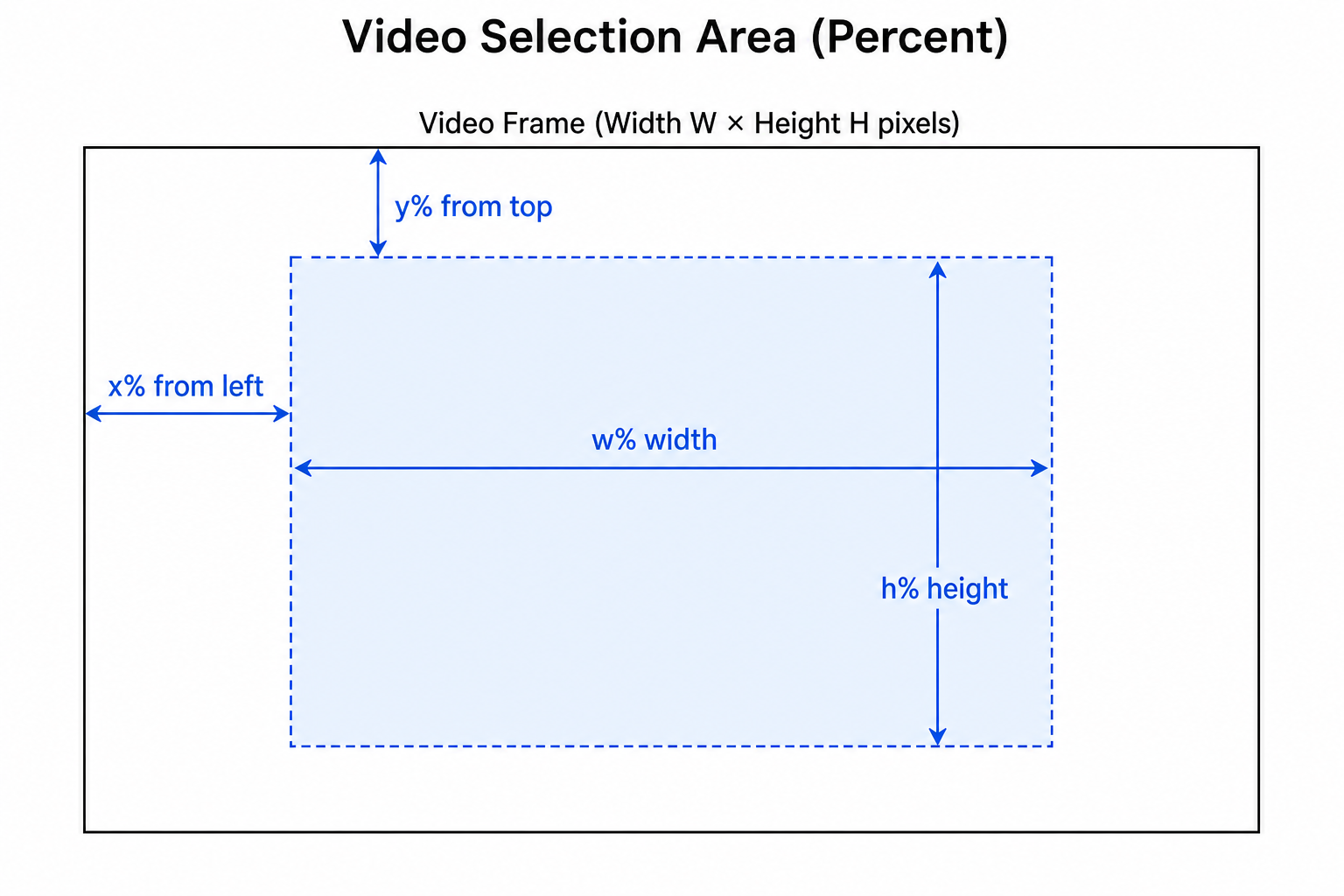
Data Structure
{
  "selectionBox": {
    "x": 25.4,
    "y": 48.1,
    "w": 33.2,
    "h": 12.6
  }
}| Field | Type | Required | Valid Range | Description |
|---|---|---|---|---|
x | number | Yes | [0, 100] | Horizontal offset of the top-left corner, as a percentage of video width |
y | number | Yes | [0, 100] | Vertical offset of the top-left corner, as a percentage of video height |
w | number | Yes | (0, 100] | Width of the selection area, as a percentage of video width |
h | number | Yes | (0, 100] | Height of the selection area, as a percentage of video height |
Coordinate Rules
- Origin: The top-left corner of the video frame is
(0, 0).xincreases to the right;yincreases downward. - Units: All fields are percentages of the video’s native width and height — not pixels, and not normalized
0~1coordinates. - Must stay inside the frame:
x + w ≤ 100andy + h ≤ 100. - Positive area:
w > 0andh > 0. - Minimum size: After conversion to pixels, both the width and height of the selection area must be at least 4 pixels. For example, on a 720×480 video,
wmust satisfyw/100 × 720 ≥ 4, i.e.w ≥ 0.56. - Shape: Only axis-aligned rectangles are supported. Rotated rectangles and polygons are not supported.
- Precision: Decimal values are supported (two decimal places are recommended, e.g.
25.40).
Usage with mode
modemode | selectionBox required? | Behavior |
|---|---|---|
auto | No (ignored if provided) | Automatic object removal across the full frame |
clear-inside | Yes | Remove content inside the selection; keep the area outside unchanged |
clear-outside | Yes | Keep content inside the selection; clear everything outside the box |
Request Example
curl -X POST 'https://api.topview.ai/common-task/video-object-remove/submit' \
  -H 'Authorization: Bearer <your-api-key>' \
  -H 'Topview-Uid: <your-topview-uid>' \
  -H 'Content-Type: application/json' \
  -d '{
    "mode": "clear-inside",
    "videoFileId": "file_abc123",
    "selectionBox": {
      "x": 25.4,
      "y": 48.1,
      "w": 33.2,
      "h": 12.6
    }
  }'
Common Errors
| Code | When it occurs |
|---|---|
4008 | Invalid mode (not auto, clear-inside, or clear-outside) |
4009 | Invalid selectionBox: missing fields, out-of-range values (< 0 or > 100), w or h ≤ 0, x + w or y + h > 100, or shortest side < 4 px after pixel conversion |
4010 | Invalid videoFileId, or the file is not a supported video format |
4011 | Failed to parse video metadata (width, height, or duration) |
FAQ
Q1: Can I pass pixel coordinates?
No. selectionBox only accepts percentage values in the range 0~100. The server converts them to pixels based on the uploaded video’s actual resolution.
Q2: Can I define a rotated or irregular region?
Not in the current version — only axis-aligned rectangles are supported. For full-frame processing without a manual box, use mode: auto.
Q3: Must x + w be strictly ≤ 100?
Yes. Values that extend beyond the frame will return error 4009. Clip or validate the box on the client before submitting.